Source preview · optional cloud
Your profile.
Encrypted on your device.
Choose whether to save an encrypted configuration, recover it with a UUID and password, or share the same voucher journal across devices.
Choose the service.
Keep
https://cloud.getvouchers.appas the default service. Normal app setup needs neither a database address nor a service token. If you operate your own compatible instance, follow its service README. Usemake devfor local development. The API useshttp://127.0.0.1:18100; PostgreSQL is internal. Use HTTPS reachable from both devices for cross-device access.Save your profile.
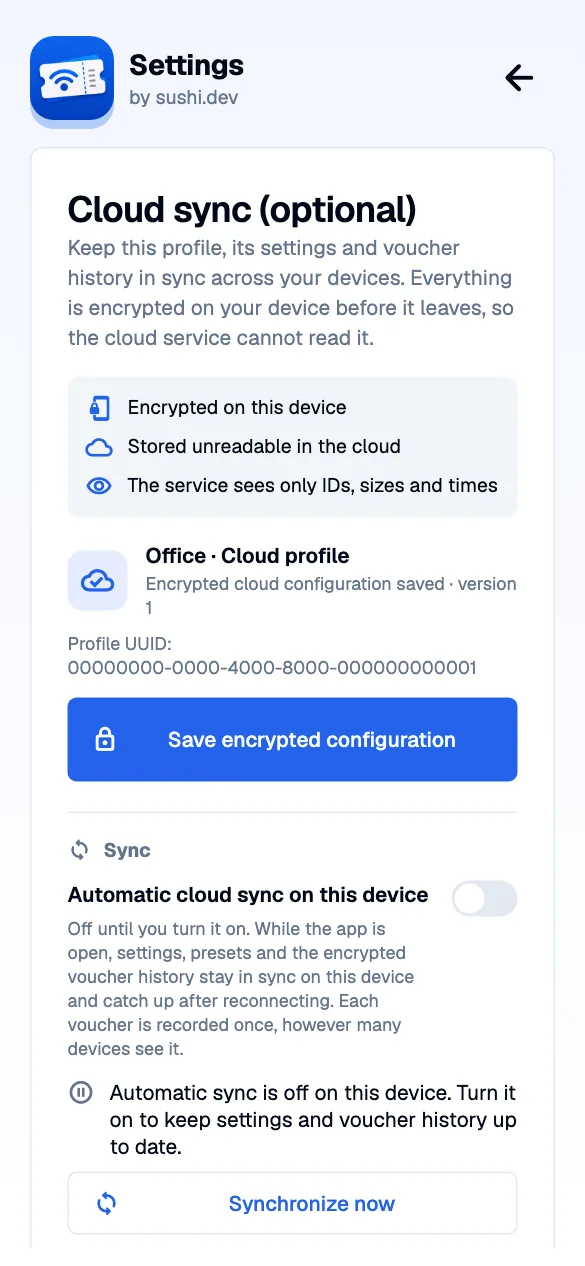
Start the app and select a configured profile. Open Settings → Cloud sync (optional). Confirm the service URL and choose Save encrypted configuration. No upload token is entered. The service confirms your public profile UUID, and the app shows the saved configuration version and a visible success message. The app retains its keys securely before uploading and encrypts the connections and operational settings locally.
Create a sharing code.
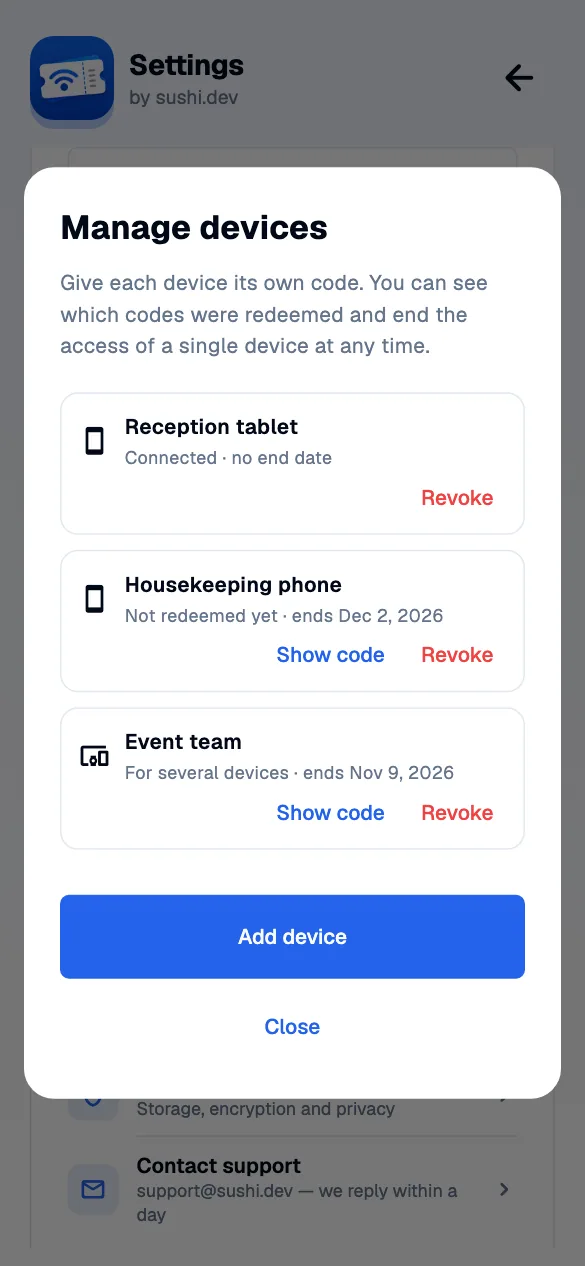
Open Manage devices and choose Add device. Give the code a name, for example “Reception tablet”. Choose whether it is valid for One device (the default) or Several devices, and when access ends: a code can have no expiry or end after 1, 7, 30 or 365 days. Create code shows the code; Share QR code opens the system share sheet with a QR image and invitation link. Give it only to the intended recipient. It contains a random secret that never reaches the service. A one-device code is bound to the first device that redeems it; a second device is refused. Anyone who has a code for several devices can pass it on.
Connect the receiver.
On iOS or Android, choose Connect with sharing code → Scan QR code, review the service address and confirm Connect. Camera access is optional; every platform also accepts a pasted code or invitation link. The receiving app decrypts and saves the profile and the code is not used up by connecting: a one-device code stays bound to that device, a code for several devices keeps working for the next one. Recipients create and revoke vouchers normally, straight from their device to the controller. Controller addresses, keys, profile management and the WiFi tab are hidden.
Choose automatic sync on each device.
Automatic cloud sync on this device starts OFF, including on a newly paired or recovered device. Turn it on to keep settings and the voucher history current while the app is open, even with the journal closed. The app checks about every three seconds: owner devices upload profile/controller changes, validity presets, quick-create voucher presets and shared WiFi passphrases when they change, and every other device applies them. Settings need no separate save. Concurrent edits on two owner devices require a visible choice. Open Voucher journal on both devices: owners and recipients see the same journal, with changes usually arriving within about one second plus network latency. Only an opaque cursor is announced; the app fetches and decrypts new entries locally. Offline devices catch up after reconnecting. A backgrounded mobile app catches up when reopened. Vouchers created or revoked on any device appear in the shared history, and each voucher is recorded once however many devices see it.
The cloud service never connects to your controller and never creates or revokes vouchers; your devices do. Language stays a per-device preference, WiFi networks hidden on a device stay hidden there, and device security, tray mode, the selected controller and connection recency stay local. With sync off, Refresh in the journal loads a manual snapshot. No new observations are collected for later automatic upload while sync is off. Failed uploads remain encrypted locally; retry from cloud settings while sync is enabled. On desktop, encrypted configurations and pending logs use SQLite; keys and access tokens remain in secure device storage.
Password recovery.
Choose Password recovery. Keep your public profile UUID and a separate strong recovery password in your password manager; the app can generate one. On another device choose Restore owner access (UUID + password). The recovery QR contains only the UUID and service address. Enter the password separately. The app derives a key locally with Argon2id and decrypts the owner keys on that device. The API never receives the password or plaintext keys. A sharing code grants recipient access; UUID + password restores owner cloud permissions.
The service hands out the encrypted recovery packet only for a capability derived from the password, and allows 10 failed attempts per profile in 15 minutes. Someone who knows only the UUID can make rate-limited online guesses, and can temporarily pause recovery (not sync) by sending wrong ones; guessing offline requires a copy of the service database. A strong password still matters. Changing or removing recovery does not revoke previously copied keys or packets. There is no email reset or operator key recovery.
Maintain and stop.
Enable automatic sync on each device to exchange settings and the voucher history. Device security preferences and connection recency stay local. Manage devices lists every code with its name, whether it was redeemed and when access ends. The owner can revoke each code separately; the others keep working. A code that was not redeemed yet can be displayed again with Show code on any owner device. When access ends, the service stops accepting that device; expired codes stay in the list until you create the next one. Revoking or expiring a code cannot take back connection details a device already decrypted, so rotate the controller or proxy key to fully remove a device. Codes from an earlier app version keep working and appear as “Sharing code from an earlier version”; they can be revoked but not displayed again. The owner can also choose Settings → Cloud sync → Delete cloud data to remove the encrypted profile, history, sharing codes and recovery packet from the service; the profile then stays on that device as a local profile. Recipients get Remove from this device, which only removes the shared profile locally. Local profile deletion does not delete cloud data, and operator backups expire on the operator’s schedule. Turning off log sync stops future automatic activity, without deleting existing entries. Ctrl-C stops the foreground local stack;
make stopkeeps its PostgreSQL volume.
Cloud questions, answered.
Do I have to use the cloud?
No. Direct controller and self-hosted proxy connections continue to work without our cloud. Cloud linking and automatic sync are optional. The new cloud workflow requires matching current app/service source builds; older store releases or deployed APIs may not include it.
Which service do I use, and do I need an upload token?
The app defaults to https://cloud.getvouchers.app. The new normal setup has no manual token field: an enabled service accepts an encrypted profile and confirms its UUID. Administrators can allow or close registration per service installation and set a profile limit. Another compatible HTTPS service can be selected before linking. A closed or older service needs an administrator update, not a guessed UniFi API key.
What is the profile UUID?
It is the public identifier of one encrypted cloud profile. The app creates a random UUID and the service confirms it at registration. The UUID alone cannot read or decrypt your profile. Authorization capabilities and encryption keys are generated and managed by the app.
How do I connect another device?
For another device you own, enable Password recovery and retain the profile UUID plus a separate strong password. Choose Restore owner access on the other device. For a recipient with a simplified interface, choose Manage devices → Add device and create a sharing code instead. iOS/Android can scan the relevant QR locally; every platform supports manual entry.
What is the difference between a sharing code and owner recovery?
A sharing code gives recipient access to the saved configuration and shared voucher journal. UUID plus recovery password restores owner cloud permissions, including configuration changes, sharing, revocation and deleting cloud data. Both roles create and revoke vouchers normally, straight from the device to the controller; recipients get a simplified view without controller addresses, keys, profile management or the WiFi tab. The cloud service itself never connects to your controller and cannot create or revoke vouchers. A recovery QR contains only UUID and service address; enter the password separately.
Are the profile and voucher codes encrypted?
Yes, in the cloud workflow. The app encrypts configuration, connection credentials and voucher-log contents before upload with XChaCha20-Poly1305. The API and PostgreSQL store ciphertext without the decryption keys or recovery password. Voucher codes inside journal entries are encrypted too. The separately operated proxy workflow deliberately lets its operator read its configuration and optional journal; it is not E2E encrypted.
What can the cloud operator see?
Public UUIDs, authorization hashes, data sizes, ordering and receipt times remain visible. For sharing codes the service sees how many a profile has, when each was created, when it ends, whether it is for one device and whether it was redeemed; their names and the codes themselves are encrypted. Network operators can see traffic metadata such as IP addresses. They cannot read the encrypted profile or voucher contents. E2E encryption does not prevent deletion, delay or omission by a malicious service, and is not a complete audit of controller activity.
What synchronizes automatically?
Enable automatic cloud sync separately on each device; it starts off. While the app is open it checks about every three seconds. Owner devices upload profile and controller changes, validity presets, quick-create voucher presets and shared WiFi passphrases when they change, and every other device, owner or recipient, applies them automatically; settings need no separate save. The voucher history receives encrypted live updates normally within about one second plus network latency. The journal need not be open. Saved connection changes are used when you reconnect. Language stays a per-device preference (recipients follow the profile’s language), WiFi networks hidden on a device stay hidden there, and device security, tray mode, the active controller selection and connection recency remain local.
What happens offline or when two devices edit the profile?
Local edits and already queued encrypted voucher entries are retained. The app retries after reconnecting and shows pending/offline status. Suspended mobile apps catch up when resumed; this is not background push delivery. Concurrent edits on two owner devices require an owner decision about which configuration to keep. The app never silently overwrites a newer revision.
Do sharing codes expire?
You decide for each code. Under Settings → Cloud sync → Manage devices → Add device you name the code, choose whether it is valid for one device (the default) or several, and choose when access ends: a code can have no expiry or end after 1, 7, 30 or 365 days. A one-device code is bound to the first device that redeems it. When access ends, the service stops accepting that device and the code can no longer be redeemed. You can revoke each code separately; the others keep working. Treat a code as a credential until then. Revocation or expiry stops future cloud access, but cannot erase copied data or revoke external controller credentials; rotate the controller or proxy key to fully remove a device. Codes created by earlier app versions keep working and can be revoked in the same list. Older one-use invitations retain their original ten-minute expiry.
Can the service recover my password or keys?
No. UUID/password recovery uses Argon2id locally to unwrap encrypted owner keys. The service receives neither the password nor plaintext keys. The service releases the encrypted recovery packet only to a device that proves it knows the password, using a capability derived from it, and allows 10 failed attempts per profile in 15 minutes. Someone who knows only your UUID can therefore make only rate-limited online guesses; guessing offline would require a copy of the service database. A strong password still matters: use the password generator and a password manager. Someone who knows the UUID can temporarily pause recovery, not sync, by sending wrong guesses. Changing or removing recovery does not invalidate keys or packets already copied.
What does turning sync off or deleting a local profile do?
Turning sync off stops automatic cloud reads and new log uploads on that device. It does not delete remote records; no new observations are collected for later automatic upload while off. Deleting a local profile also does not delete the cloud copy or backups. To delete the cloud copy, the owner chooses Delete cloud data in cloud settings; backups follow the operator’s retention policy.
How do I delete my cloud data?
As the owner, open Settings → Cloud sync and choose Delete cloud data. This removes the encrypted profile, voucher history, sharing codes and password recovery from the service. Linked devices lose cloud access, and the profile stays on your device as an ordinary local profile. Recipients see Remove from this device instead, which only removes the shared profile from that device. Backups held by the service operator expire on the operator’s schedule.
Will the same voucher show up twice in the history?
No. Every device derives the same ID for the same voucher and action, and the service stores each ID once, so each voucher is recorded once however many devices see it. Vouchers created or revoked on any device appear in the shared history. A voucher that a device merely sees is recorded as observed at most once, and not at all if its creation or revocation is already there. Older histories with repeated observations are shown de-duplicated.
How do I know a save or synchronization worked?
Cloud settings show a saved version, the profile UUID and a success or error message after an action. Automatic sync has separate syncing, up-to-date, pending/offline and conflict states. A failed request is not a successful save. If registration is closed, capacity is reached or the service is incompatible, the app explains that condition without asking for a guessed token. See the setup guide.
Can I build a compatible service myself?
Yes. The public protocol reference documents the endpoints, JSON formats, UUID registration, HKDF/AAD, encrypted journals, sharing and password recovery. Download its public interoperability vectors to check your implementation. HTTPS and scoped controller/proxy credentials remain necessary.
Do I need an account for the cloud service?
No. There is no sign-up, email address or login. The app creates a random profile UUID and its own keys on your device; the service only confirms the UUID. Access comes from those keys, a sharing code from the owner, or the owner's UUID plus recovery password.
Does the cloud service connect to my UniFi controller?
No. The service only stores encrypted copies of the profile and the voucher history. Creating and revoking vouchers always goes straight from your device to your controller or your own proxy, so the service never needs to reach your network.
What happens if the cloud service is unavailable?
You keep working. Vouchers are created and revoked directly on your controller, and the profile stays saved on your device. Changes and voucher events are queued as ciphertext on the device and uploaded once the service answers again.
How do I remove a single device?
As the owner, open Settings → Cloud sync → Manage devices. Every device has its own named sharing code with its status and end date. Choose Revoke on that entry; the other devices keep working. A revoked device keeps the connection details it already received, so renew the controller or proxy key if it must lose access completely.
Are there limits on the cloud service?
Yes, so one profile cannot fill the service. A profile can have up to 64 sharing codes and 10,000 voucher history entries or 10 MB of encrypted history. Each installation also limits how many profiles it accepts. When a limit is reached the app reports it and keeps the data on your device.
What happens after several wrong recovery passwords?
After 10 failed attempts for a profile within 15 minutes, the service refuses further recovery attempts for that profile until the window has passed. The service only releases the encrypted recovery packet to someone who proves knowledge of the password, and it never sees the password itself.